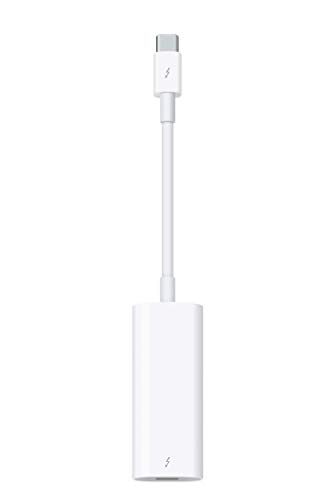


⚡ Future-proof your Mac setup with Apple’s ultimate Thunderbolt bridge!
The Apple Thunderbolt 3 (USB-C) to Thunderbolt 2 Adapter is a high-quality, bidirectional adapter that connects Thunderbolt and Thunderbolt 2 devices to Thunderbolt 3 USB-C ports on Macs. Supporting up to 40 Gbps data transfer speeds, it enables seamless integration of legacy external drives and displays with modern MacBook Pros and other Thunderbolt 3-enabled devices. Designed and built by Apple, it ensures reliable, high-speed data and video transmission, making it an essential accessory for professionals bridging old and new technology.
| ASIN | B01MQ26QIY |
| Date First Available | November 1, 2018 |
| Is Discontinued By Manufacturer | No |
| Item Weight | 1.92 ounces |
| Item model number | MMEL2AM/A |
| Manufacturer | Apple |
| Product Dimensions | 2.6 x 0.7 x 7.8 inches |
O**D
Thunderbolt magic
Perfect. Worked great
R**Y
Hideously Expensive. It Also Works Great. But Make Sure You Need It Before Purchasing!
I have an expensive portable Western Digital RAID drive (see it at WD 2TB My Passport Pro Portable External Hard Drive - Thunderbolt - WDBRMP0020DBK-NESN ) that uses a Thunderbolt 2 connection. When the new MacBook Pro 13 inch models came out, they had nothing but USB-C ports (running Thunderbolt 3: confused yet?). So, my portable RAID drive instantly became useless, because there was no way to connect that existing drive to the new MacBook Pro. This situation may never be a problem for you, unless you, like me, are attempting to connect a Thunderbolt 2 drive to one of the new Thunderbolt 3/USB 3 ports like those found on the new MacBookPros. But if you are, you'll need this adapter, which facilitates such a connection. It's one of the few of its type on the market, but if you need it, you NEED it. It is well-built, and I've had no trouble with it on multiple Thunderbolt 2 drives I have been using. It's physically larger than most dongle-style connectors, with a large, rounded plastic body on one end, undoubtedly where the circuitry and microchips reside to perform the data stream conversion between Thunderbolt 2 and 3. (It also very likely accounts for the high price of the connector, because of the requirement to use controller chips to make the Thunderbolt 2 to Thunderbolt 3 connection possible). So, I recommend it highly because it works so well, and is built with very high quality. But it is quite expensive. However, if you need it, I would go with this model than some third-party brand that might show up, because Thunderbolt (either 2 or 3) is a modern, high-speed transfer format, and you want to ensure maximum transfer speed with uncorrupted data transfer. Note: This entire subject discussion becomes even more complicated because, with the "old" Thunderbolt 2 standard, the physical plug is exactly the same as the "Mini Display Port" connector type. Who dreamed up that bright idea? One (Thunderbolt) transfers DATA AND VIDEO, and the other (MiniDisplayPort), VIDEO ONLY, but they are physically exactly the same! Now, to confuse us further, throw in Thunderbolt 3, and a simultaneous upgrade to USB in the form of USB 3, followed by the decision to make USB 3 and Thunderbolt 3 intra-compatible, you're sitting there, scratching your head sometimes. Do a web search for C|Net's Article on Thunderbolt 3 and USB 3, and they lay it out in all it's intertwined (no pun intended) glory. But, in spite of all the ways you can get confused, if you have a true Thunderbolt 3 connection with a Thunderbolt 3 drive, wow, is it fast (shockingly, up to 40 Gbps). This is the future of connections, so be ready for it. But the thing to note is that USB 3 is a description of a PHYSICAL CONNECTOR. That USB 3 connector might be running Thunderbolt 2, Thunderbolt 3, DisplayPort, and/or USB 3.1 (!). Thunderbolt, DisplayPort, USB 3.1, etc. are examples of PROTOCOLS, and each can run on the physical connector USB 3, but you have to determine what protocol your device and computer support whenever you are using USB 3. The cable may physically fit, but the devices on both ends (plus the cable itself) must all support the same protocol for them to work. Whew.
L**L
Makes using an Apple monitor usable with a PC
Just what I needed! Worked great for connecting my large Apple monitor to a personal computer.
2**T
May be the only truly functional TB3/4 <--> TB2 adapters on the market.
This is a very expensive part, but comprises much more functionality than most ordinary 'adapters', and it works bi-directionally. As far as I can tell, there is *no* functional equivalent on the market. TB/2/3/4 each have unique capabilities. Each generation of Thunderbolt has specific capabilities, but it's the attached equipment that determine which functions are used. There are far too many combinations and permutations of Thunderbolt and attached equipment to described applicable technical details, particularly when in reality, most product offer few hard specifications. TB applications include video, storage, and data transfer, but many applications concentrate on some sub-set of these, leaving the other uses as an afterthought or not mentioned at all. The two common different functions are: attachments for data storage, and for video equipment. Most specs focus on one of these, leaving the other an afterthought. Which get attention is determined by the vendor's primary market. The situation is so complex that the user can rarely determine whether or how well their combination of equipment will work, especially because bandwidth can be allocated to each function in ways that differ among vendors. In the gamer world, focus is on Thunderbolt display refresh rate using DisplayPort video/audio. Among "Professional" users, Thunderbolt is used for transfer and backup of video files produced by the 4K+ video cameras. The files are so large that high speed transfer is essential to get the daily tasks finished. Consequently, most products focus on one or the other of these, the remainder an afterthought, or un-mentioned. This is the nature of an industry that attempts to "standardize" everything, failing to recognize that "letting the marketplace decide" is to have, effectively, no standard. You're on your own. I suggest reading Wikipedia's overview of "USB" and its generations. Vendors have made a complete mess of that marketplace, and they're out to do the same for Thunderbolt. The bottom line for anyone interested in Thunderbolt can be bolded down to 1) look for "Intel Certified Thunderbolt" device, and 2) the lightning symbol, with a number on Thunderbolt cable ends, signifying the generation and supported data rate. Otherwise, they may be USB4, but they aren't Thunderbolt.
R**N
New life for my old 27” thunderbolt apple cinema
It works. I can connect my 2019 MacBook Pro (the one with the touchbar and usb-c/thunderbolt ports only) to my old thunderbolt apple cinema 27” thunderbolt 2 monitor (the one with the lightning icon on the video plug, not the mini dvi box looking thing). I can control brightness, it plays sound well. Saves the old monitor from the landfill. 4 stars because it overpriced dongle problem apple created by not following standards. Also when using Teams for video conferencing my video signal from the camera in the display gets severely crushed/pixelated by the dongle. It’s like it only has enough throughput to send the image to the monitor, not back to the computer from the camera. I just use the laptop camera. Otherwise works great. EDIT: the dongle also does not have enough throughput to transmit sounds from the microphone clearly. In summary. it does well sending sound and images from the laptop to the display, but poorly at sending video and microphone signal back to the laptop. TLDR; you have to set your video camera and microphone to your laptop sources to get good quality when in a video conference.
L**Z
Me funcionó perfectamente, gracias
P**L
I bought this to connect a Thunderbolt 3 SSD RAID enclosure to an old Thunderbolt 2 iMac. I also had to buy an extra Thunderbolt 2 cable to connect the adapter to the iMac. Thunderbolt 2 ports don't deliver enough power to run Thunderbolt 3 devices, so you can only use this adapter with Thunderbolt 3 devices that have their own separate power cable. This works perfectly and provides expected data rates, as long as you understand that you also need a TB2 cable and to provide separate device power.
M**M
If you’re hanging onto an older MacBook or external display, this adapter is a lifesaver. I use it to connect my Thunderbolt 2 hard drive to my newer MacBook Pro and it works seamlessly—no weird glitches or lag. It’s an official Apple adapter, so it’s not cheap, but you’re paying for reliability. I’ve tried off-brand versions that either didn’t work or felt flimsy, so this was worth the extra few bucks. Just plug and go. No setup, no drama.
P**R
I bought this in a forlorn attempt to connect my WD velociraptor to my new computer with Thunderbolt 4. Cannot be done. Not apples fault but Thunderbolt 4 ditched backward compatibility with versions 1 and 2. It looks great and probably works well within the Thunderbolt compatibility limitations. Anyway I gave it and the disks to a friend with an Apple Mac and he is very happy.
E**T
Bought a LaCie 6TB big drive about 5 years ago which was Thunderbolt 1 standard. Bad news is my older iMac packed it in. Bought a New iMac that only has USB-C (Thunderbolt 3 connector). This adapter description only says backward compatible with Thunderbolt 2. The IEEE standard says TB2 is backward compatible with TB1 so using logic, this adapter should work with USB-C. Good news is it did ! My Lacie TB1 drive works perfectly from the USB-C interface. The adapter is too expensive IMO but I was desperate and now my family photos and pictures are still accessible.
Trustpilot
1 day ago
2 weeks ago


