
💿 Burn Bright, Burn Fast — Stay Ahead with Asus Optical Power!
The Asus DRW-24B1ST is a high-performance internal DVD+/-RW drive featuring 24X write speeds, dual-layer support, and ultra-fast 150ms random access. Designed for professionals who demand reliable archival and data transfer, it includes secure erase capabilities and a SATA interface for easy installation. Trusted by thousands with a 4.6-star rating, this drive blends classic optical tech with modern efficiency—perfect for those who refuse to let legacy data fade away.

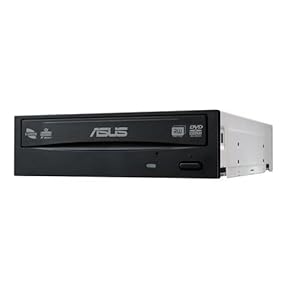
| ASIN | B0033Z2BAQ |
| Best Sellers Rank | #24 in Internal CD & DVD Drives |
| Customer Reviews | 4.6 4.6 out of 5 stars (9,914) |
| Date First Available | January 12, 2010 |
| Is Discontinued By Manufacturer | No |
| Item Weight | 1.19 pounds |
| Item model number | 90-D40FJB-UBN10 |
| Manufacturer | Asus |
| Product Dimensions | 6.7 x 5.75 x 1.63 inches |
F**S
A good, inexpensive, internal DVD drive with included burning software
The internal DVD burner in my IBM Thinkstation D30 desktop crapped out on me a week ago. It destroyed every DVD that went into it using Nero software, the last 5 times I tried it, which was over the course of a couple of days. After 5 "coasters" I'd had enough, and figured that the most likely solution would be to replace the burner, since these things are now basically all cheap junk. Replacing the drive was easy; basically, you just have to shut down your PC, remove all of the cables, then open the case somewhere in good light where you can see what you are doing. Most computer cases these days are modular and tool-less or nearly so. You just need to unhook a couple of cables (SATA data and SATA power) from the old drive, slide it out (you may need to depress a tab or two, or even remove a few screws in rare cases), then slide in the new drive and hook up the cables. This would be a good time to look around the innards of your computer and make sure that all the cables and connectors going to other drives and devices are properly seated and connected; try each one that you can see, and push it all the way in. You should also take a can of dust-off and blow out any dust that has accumulated inside the case and on the fan blades. The DVD drive came, unexpectedly, with Cyberlink Power 2 Go DVD and CD burning software, a regular (not trial) version. On the one use I did with it, I liked it better than my old Nero software. The drive works fine, so far, with both reading and writing DVDs. I use DVDs for archival data storage in a safety deposit box. Optical drives are largely obsolete, but still come in handy for such things as giving your CPA scans of documents needed to prepare your tax returns, and other tasks where you want to give data files to someone but you don't want to spend very much on the media, so it doesn't need to be returned to you, as likely would be the case with a portable disk drive or a thumb drive. Addendum: I ordered a second one of these drives a week later, which arrived 3/20/2018. This drive was packaged a little differently and came with nothing else, specifically NO software disk. So it appears that what you get is what you get, and don't count on getting the free burning software with the drive.
W**.
A very reasonably priced burner with a reasonable feature set.
Okay for starters, given the price, if it lasts two years of normal use, it'll earn it's keep and then some. Secondly, I am seeing people complain about it not including the cables. Having been a system builder for the better part of two decades because I'm in the process of transitioning into a dinosaur, this is unfortunately very common. The reality is you can buy a three pack of SATA 3.0 (6 Gbps) cables for less than ten bucks. In the world of marketing, given the current price of this drive, each additional dollar represents a five percent increase in price. They do this math on pretty much every thing tech related these days. In truth, you wouldn't want the included cables anyway, as to this day whenever SATA cables are included, they're so substandard they can literally cause your system to hang while accessing a drive. You're better off. I have included a screen shot of VSO Inspector listing all of the features and standards supported, as well as firmware version info. One thing to note, Asus does not have a newer firmware available. In fact the one on their site is 1.0 versus the 1.11 on these drives. Do not download that firmware, it is essentially a downgrade, which is bad. There is literally only one CD or DVD format that is wholly unsupported on this drive: DVD-RAM. While this won't matter to you, I'm a bizarre media aficionado. I have HD-DVD RW and HD-DVD R discs, working 5,25" floppy drives, and if I could, I'd own a working Laserdisc burner. I'm a weirdo. I do actually have DVD-RAM discs with valuable data on them, and this is sort of a bummer, but expected, as DVD-RAM even when it was in play as a standard was still rare for the most part. Healthcare used it a bit, and the very first DVR boxes did too. I could ramble about how Magneto-Optical drives were sort of DVD-RAM drives as well, but that's another day. You may have noticed they mentioned this drive also supports a secure erase functionality. You should pay attention to this, as it works even if files on an old CD-R or DVD-R are unreadable. It does not just work on rewriteable, it works on single write media (see attached pics). The data erasure functionality is a little unsteady, but it works using ImgBurn freeware if you select the "SmartErase" option and run the "full" erase. It's under the "Tools" menu. Takes about 15 minutes a disc in my experience. After it finishes, the same disc will report as "Incompatible Medium Installed" which means at the very least the media identifier and table of contents have gone bye bye. Hopefully the data track(s) are gone too? No real way to know, unfortunately. If you're paranoid when it comes to data and disposal, this erase functionality is great. One more layer of security in a world it pays to be excessively cautious in. I wouldn't say you can rely on it, but it works. I'd still shred or destroy the media as you see fit as well. I know DVD recording is becoming a relic, and while I could actually get mad I spent ten times as much fifteen years ago on what was basically the same drive, I'm actually glad we've progressed as much as we have. My one and only real ding against this drive: the tray does not lend well to vertical loading. Be sure to pay attention if you're installing this on an old slim formfactor or Dell Optiplex "DT" formfactor computer. There's not enough of a lip to stop the disc from tipping a few degrees and getting jammed. You've been warned. My DVD+R and DVD-R burns are 3 for 3, no failures thus far. Burned at 8x and 16x, seem solid.
T**R
Excellent Value, Offload Wear from Expensive Drives, Not Too Quiet
This drive is an excellent value. It (1) just works without any noticeable issue, (2) comes with decent software even though it is OEM, and (3) in this price range is everything you could expect. It isn't very quiet, but no more than any other drive I've ever had for installing stuff from disc, but the noise is plenty acceptable for odd jobs. For the price, I am thrilled that it just works perfectly without letting me down. Despite being OEM, it actually comes quite software and utilities that are better than your most basic (in my humble opinion), but doesn't seem as nice as the software that came with my blu-ray writer that was 4 times the price (which is more than reasonable). I am most interested in offloading wear and tear from a more expensive blu-ray writer when only reading or burning CDs or DVDs. I'd rather use up the life span of a cheap, high value drive, and save the expensive drive for uses that only it can solve and last longer. Plus, a dual drive setup is especially helpful if you want to copy anything so that you have both source and target drives and can copy direct from one to the other in half the time. If only to have a source drive, and you need only a CD or DVD reader, for the same price you might as well get this DVD writer for the same price. So 5-stars for excellent value, it just works, and has better software than I expected. Of course a blu-ray reader & writer at 4 times the price will likely be quieter, optimized for playing movies, and probably have better software.
S**N
i think its the most cheap and best product whatever we want from a cd driver its having every thing of the in the lowest price with a nice sleek heavy body from asus
J**H
Love it. i always liked Asus products, i have an Asus monitor and used to have a computer with Asus motherboard, they always worked great. I still use the Asus monitor daily. This DVD RW is no exception, the same high Asus quality i have become used to. Very easy install, just plug in the 2 cables, mount it with screws, and power up. Windows installs the new device automatically. the only negative, it did not come with mounting screws, i had to thief them from the old drive. Overall, very pleased.
A**G
Buen producto llegó antes de lo esperado y todo funcionando correctamente
K**8
No prolemo.
B**M
Son pleased with purchase for his computer
Trustpilot
3 weeks ago
4 days ago


